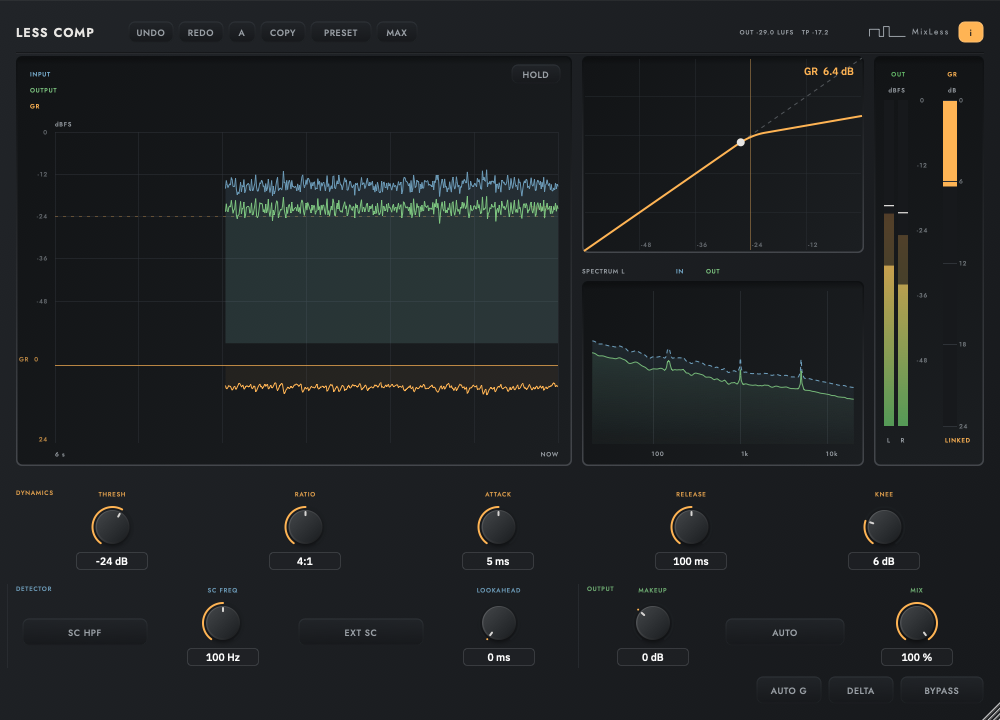
The display above is a simplified drawing of the plugin's own display, running in the page.
The first minute
| Do | What happens |
|---|---|
| Insert it and play the busiest bar | Watch blue input and green final output move across the history. |
| Lower the threshold | Use the amber GR trace to see when the detector starts reducing gain. A soft knee makes the transition gradual. |
| Set the ratio | Raise the ratio for stronger reduction above the threshold; compare the output level as you adjust. |
| Set attack and release by ear | Follow the recovery of the amber trace between hits, then match the output level for your listening comparison. |
Reading the screen
History moves toward NOW on the right. Blue is stereo peak input aligned to lookahead, green is final output, and amber is detector gain reduction before makeup, mix and bypass. The spectrum below compares the left input and output channels.
| What you see | What it means |
|---|---|
| INPUT, blue | Stereo peak input over the last six seconds, aligned to lookahead. |
| OUTPUT, green | Final stereo peak output, including makeup, mix and bypass. |
| GR, amber | Detector reduction before makeup, mix and bypass; it is not simply the gap between input and output. |
| SPECTRUM L | Dashed blue input and solid green output for the left channel. Compression is broadband. |
| L / R output meters | Each channel has its own RMS bar, peak layer and held peak line. |
| LINKED GR | Both channels receive the same compressor gain reduction. |
The controls
| Control | What it does |
|---|---|
| THRESHOLD | Where compression starts. |
| RATIO | How hard it compresses above the threshold. |
| ATTACK, RELEASE | How fast it grabs and lets go. Transients live here. |
| KNEE | How gradually the ratio arrives. |
| MAKEUP | Gain added after compression, to match levels again. |
| SIDECHAIN | Compress this channel from another one. The classic use is a bass ducking under a kick. |
| LOOKAHEAD | Delays the audio so the detector sees the transient coming. Costs 240 samples of latency at 5 ms. |
How to work with it
Set threshold and ratio while following GR. Adjust attack and release by ear, then use AUTO G or makeup to compare at a similar loudness. Check the spectrum and L/R meters as you listen.